


MyChitChat
Submitted By
Hits
30,429
Date Added
Last Update
Never
Version
1.0.0
Status
Stable
Website
Forum Thread
License
GNU General Public License|

MyChitChat (1.0.0 RC) - for MediaPortal 1.2.0 BETA!
all the details will be updated asap in this very first post - now I need sleep steady hands for typing!
Documentation:
Description:This is my 2nd Plugin after the MySleepTimer. Spoiler: Another one involving "cats" is on it's way ;-).Versions:
MyChitChat is a plugin that allows you to send and receive instant chat messages via the Jabber/XMPP network and supported transports like ICQ, AIM, MSN, GTalk and many others as well. You can view your contact list and see who is online or has send you a message and reply instantly.Changelog:
- current:
MyChitChat 1.0.0 RC (community reported bugs fixed)- previous:
MyChitChat 0.9.0 Alpha (initial public release)Features:
- since 0.9.0 (Alpha)
- double notification bug fixed!
- skin navigation fixed (set OnLeft, OnRight controls)
- skin adjustments (resized columns a bit, removed overlaps)
- enhanced error recovery (i.e. on hibernate, server/ client errors, lost connection, ...)
- current Tune & Activity publication is now fully configurable (adresses privacy concerns)
- added event handling for PlayBackChanged (updates and publishes Tune/Activity correctly now)
- added event handling for PlayBackStopped (resets Activity to default / empties Tune info)
- Instant Messaging via Jabber/XMPP
- Yepp you heard that right ICQ, AIM, MSN, GTalk, IRC and many others right inside MediaPortal!
- Send/Retrive Presence Data
- Select & Set Your Online Status (Available, Ready to Chat, Away, Extended Away, Do not Disturb, Unavailable, Invisible)
- Send a custom status message
- Select your status on MediaPortal startup (optional)
- Automatically set customizable idle status when not in plugin/timeout
- Select & Set your current Mood (happy, excited, grumpy, ...)
- Send a custom mood message
- Select & Set your current Activity (working, sleeping, studying, gaming, socialising, ...)
- Send a custom activity message
- Automatically send current tune/media information on playback (title, artist, album, etc.)*
- Retrieve Contacts presence (status, mood, activity) and custom messages
- Retrieve & display contact Avatar images
- Customizable notifications for events (new message, contact status/mood/activity/tune updates, error
- Global notifications within MediaPortal even when the plugin isn't shown
- Conversation history per contact (no persistance between restarts though)
- Contact List filtering (online, offline, all)
- Disconnect/Reconnect Jabber account within MediaPortal
- Selectable input types (default keyboard, sms input, web keyboard)
- Last active Contact automatically selected in the list
- Ultra fast reply by simply starting to type (while a contact is selected in the list)**
- Fully skinnable status, mood and activity icons (i.e. plugin checks for [statustype].png on the fly)
- Fully skinnable message status icons (unread, read, replied, send)
- Multilanguage support
- Full event log
- Extended error logging (please rember to attach logs, they are crucial for finding/eliminating bugs)
* This is default enabled for now and not fully tested (listens to PlayBackStarted event in g_Player) Privacy concerns!Screenshots:
** I'm having problems with some hardcoded keys like 'h' which automatically returns to home screen
Download:Installation:
- preferred: via "MediaPortal Extension Installer" (uncheck "Stable only" for now)
- optional: via MediaPortal Plugin Repository
- optional: directly download at the bottom of this post
Configuration:
- preferred: Automatically via "MediaPortal Extension Installer" (this way you'll get auto-updates!)
- optional: by double-clicking the downloaded '*.mpe1' file and following the installation wizard
GUI Elements & Usage:Skins:
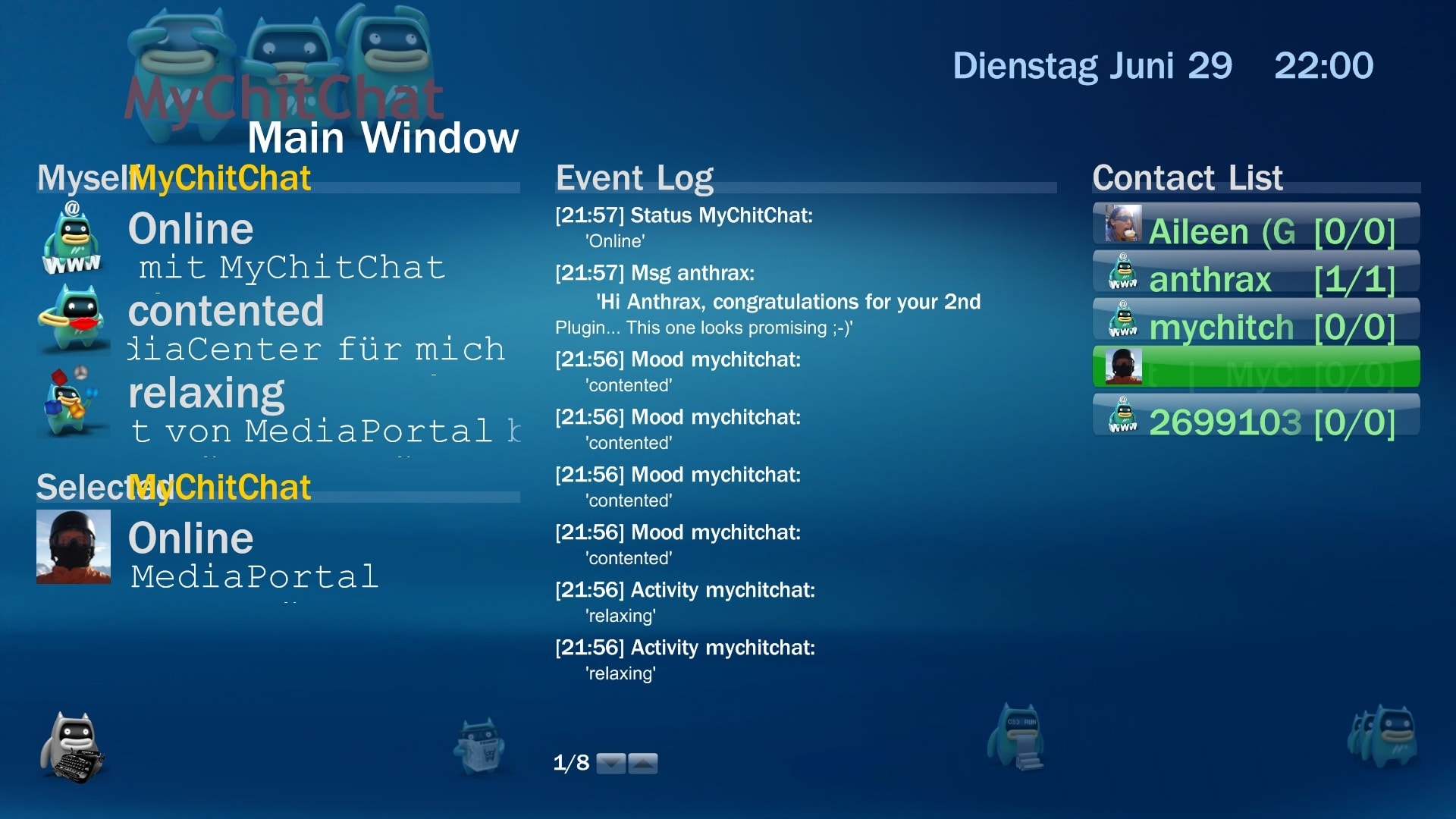
- Main Window
Open the Plugin in MediaPortal to see your Jabber status and contact list. Select (hover) a contact from a List to see his/her last Message, online status and avatar image. Click on a Contact from the list to open the Chat window. Click on the Reply button on the lower left to write a new message to the currently selected contact. If a contact is currently selected and you want to quickly send a message her/him just start typing and the virtual keybord will come up (just don't start with the letter 'h' ;-) )- Status information (left hand column)
- Your Jabber account name
- Your online status & message
- Your mood & message
- Your activity & message
- Selected Contact's nickname
- Selected Contact's online status & message
- Selected Contact's Avatar image (if available)
- Selected Contact's last chat message
- Reply button (MePo icon with typewriter on the lower left)
- Event log (middle column)
- This textbox contains the history of all event that occured (like incoming message, contact online status update, tune changed, errors, etc.)
- Contact list (right hand column)
- Contains all the contacts you added to your Jabber account (should look exactly like the desktop client's contact list)
- The list is filtered by default to show online contacts only (change this via context menu (F9))
- Listitem label: Contact's Nickname [unread/overall messages]
- Listitem icon: if available the contact's avatar image or else an online status icon (i.e. available, ready to chat, away,...)
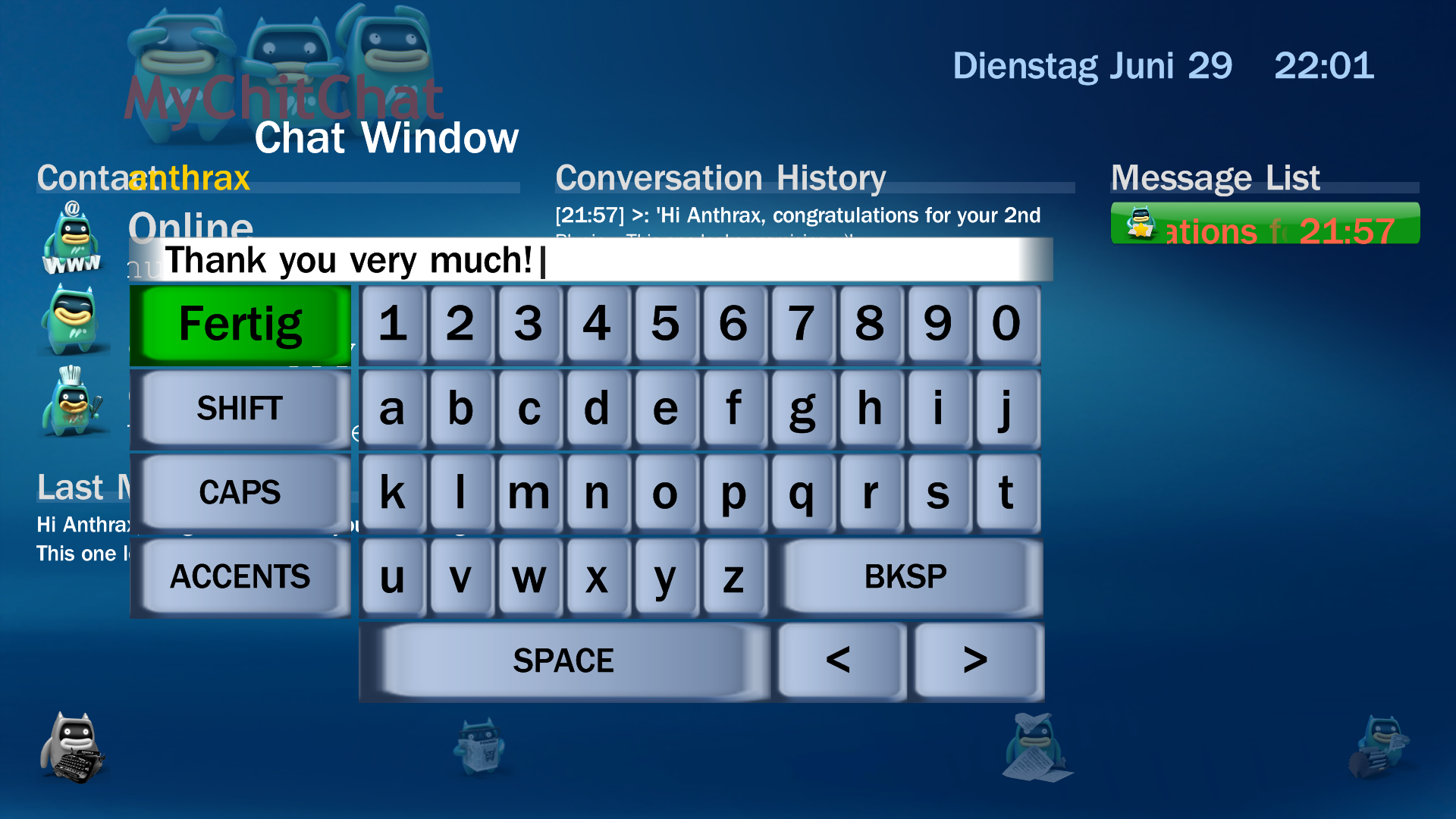
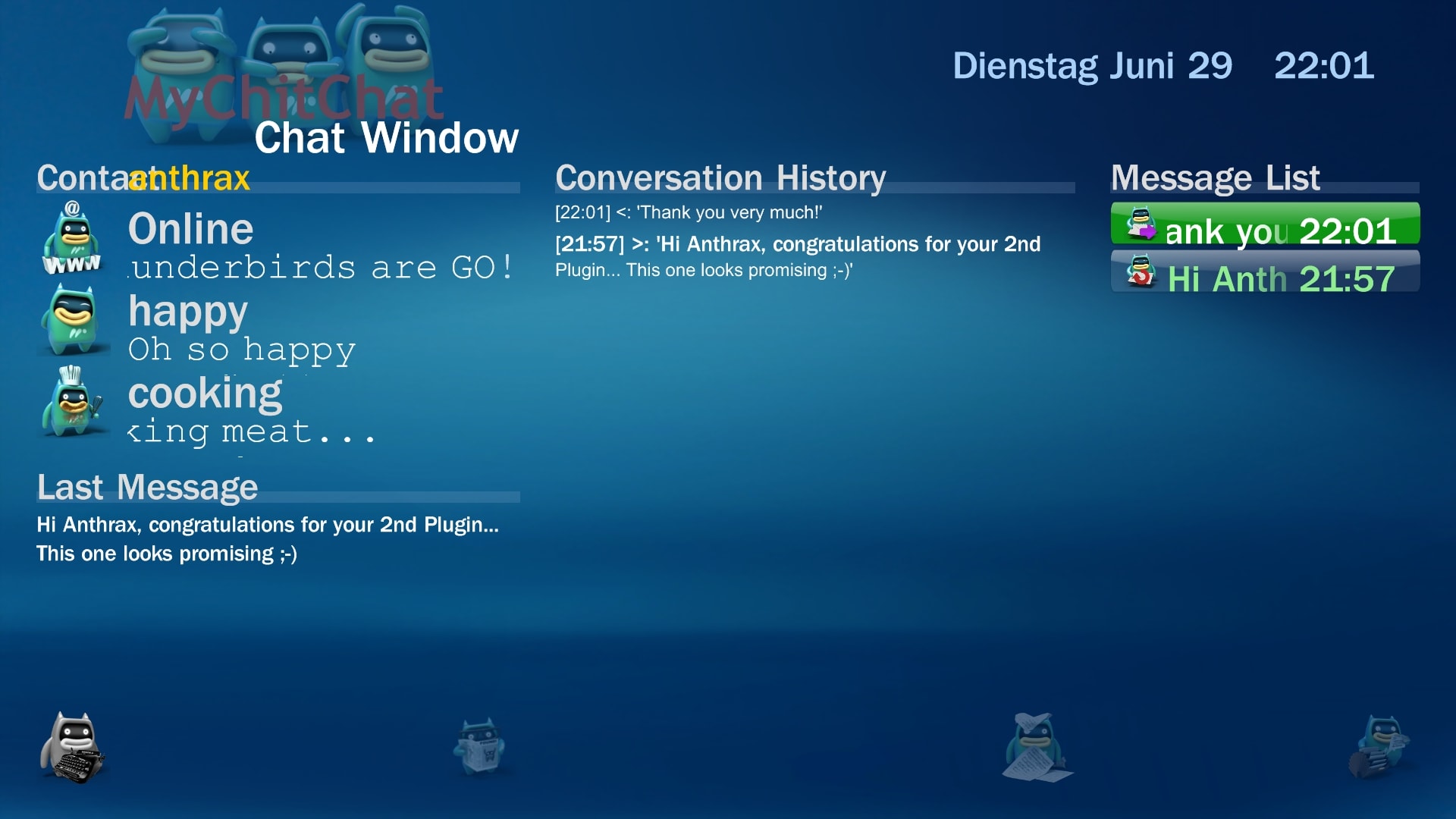
- Chat Window
This window shows the complete conversion history for the currently selected contact- Selected Contact's status information (left hand column)
- Contact's nickname
- Contact's online status & message
- Contact's mood & message
- Contact'sactivity & message
- Contact's Avatar image (if available)
- Last chat message (incoming or outgoing)
- Conversation history (middle column)
- plain text of all messages from/to this contact in reverse chronological order (new on top)
- Every message is shown with sent/received timestamp and direction ('>' incoming / '
- Message list (right hand column)
- Contains all messages from/to this contact in reverse chronological order (new on top)
- Listitem label: Message subject (or shortened message body) and sent/receive timestamp
- Listitem icon: depicts the message type/status (i.e. incoming, outgoing, unread, read, replied)
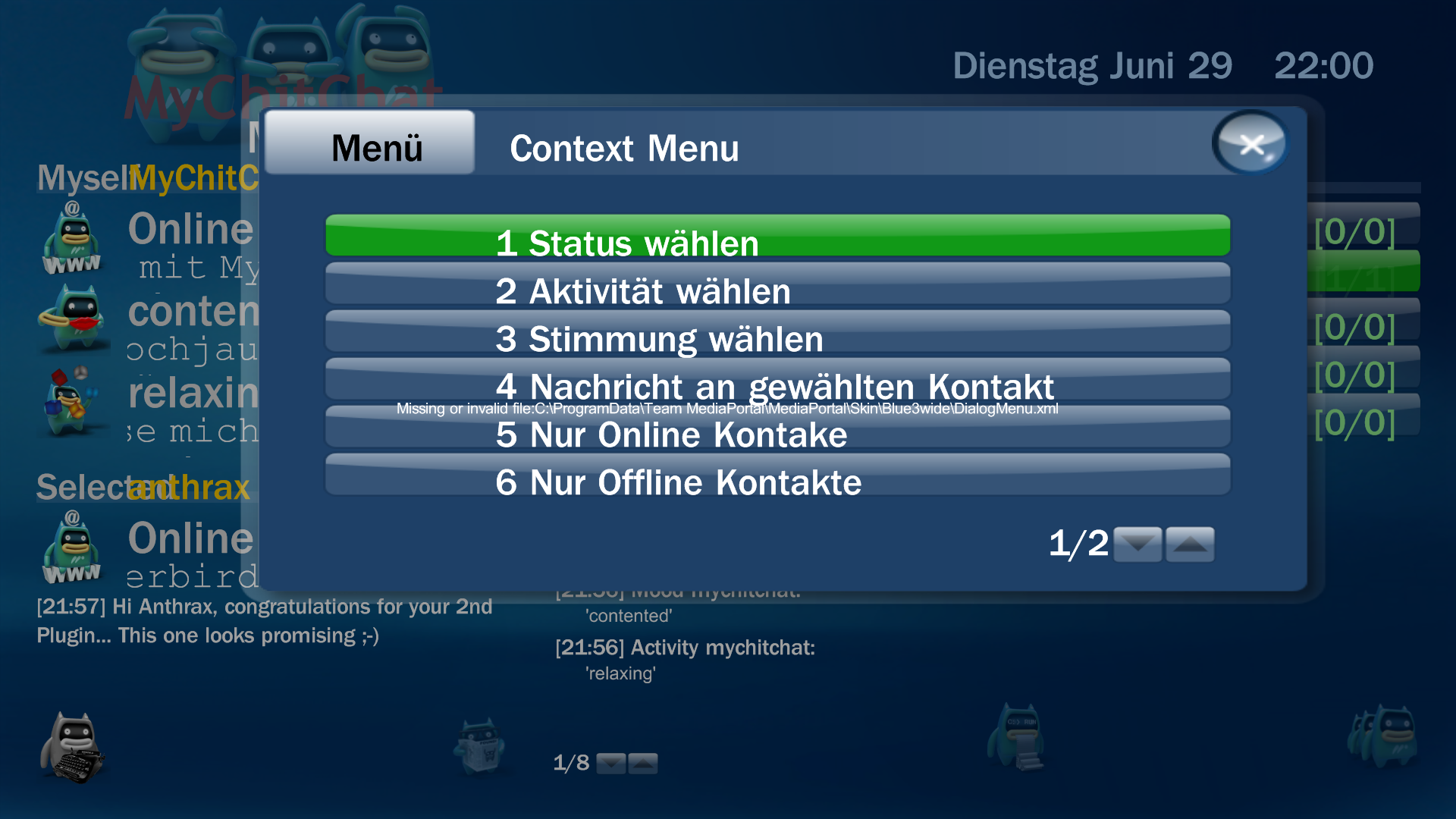
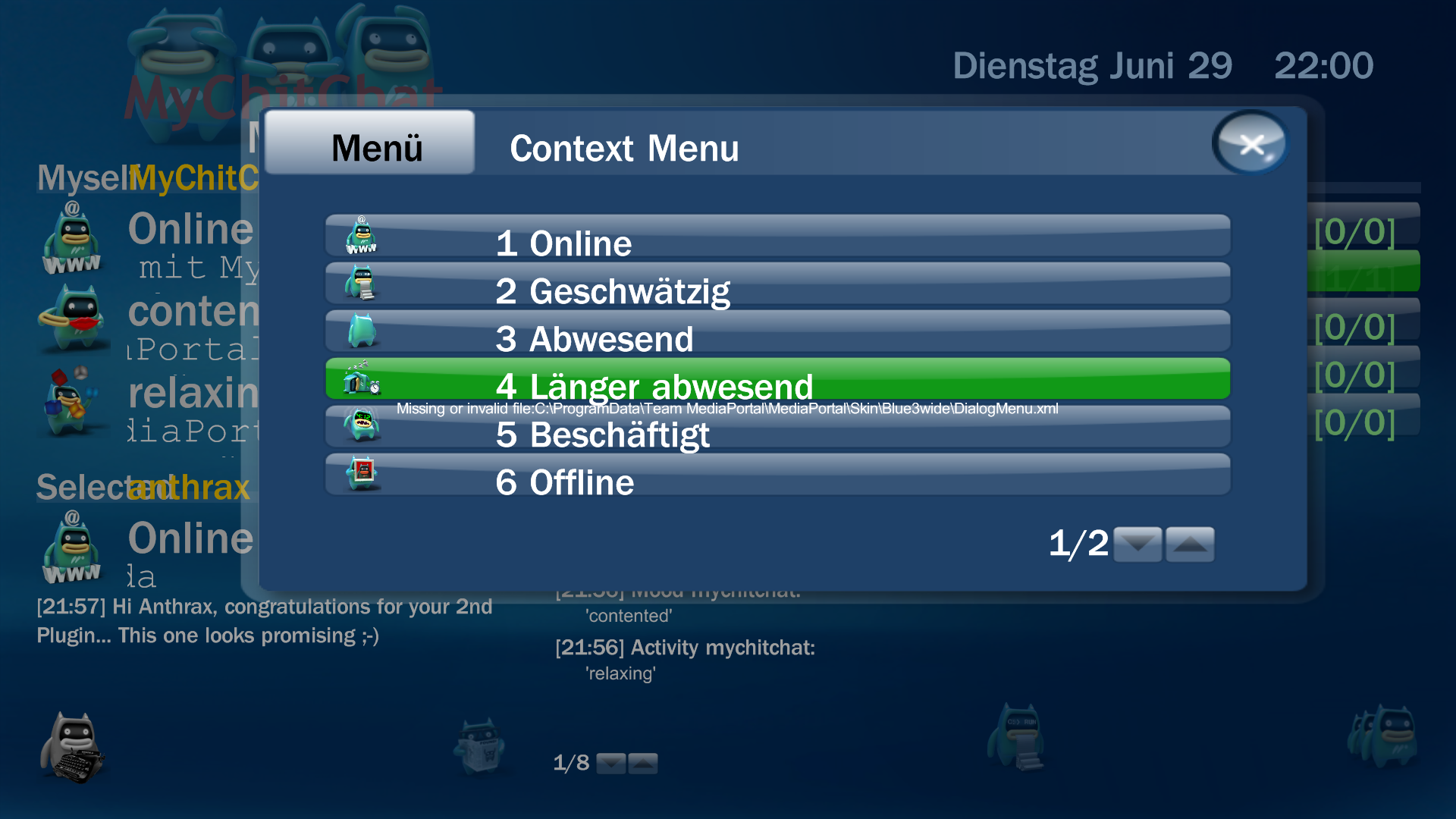
- Context Menu (F9)
This dialog menu will provide context sensitive options/settings. This menu and all subsequent menus are fully multilanguage supported.- "Set My Status"
- "Available"
- "Ready to chat"
- "Away"
- "Extended away"
- "Do not disturb"
- "Unvailable"
- "Invisible"
- "Custom..." (Select a status and write a custom status message)
- "Set My Activity"
- "doing maintenance
- "doing the dishes";
- "doing the laundry";
- "unning an errand";
- "walking the dog";
- "having a beer";
- "having coffee";
- "having tea";
- [...]
- "Custom..." (Select an activity and write a custom activity message)
- "Set My Mood"
- "afraid"
- "amazed"
- "angry"
- "annoyed"
- "anxious"
- "aroused"
- "ashamed"
- [...]
- "Custom..." (Select a mood and write a custom mood message)
- "IM selected Contact"
- "Show all Contacts"
- "Show Online only"
- "Show Offline only"
- "Jabber reconnect"
- "Jabber disconnect"
- "Set Keyboard type"
- "Cancel"
Translations:
- Generic Skin (should work with all skins)
Icons:
- The plugin's default language is english
- The Plugin is fully translateable (at least will be)
- Everybody is invited to create a translation file for their language of choice ;-)
- Have a look at the Plugin Configuration, there you'll find a button to create a new language template
- fear not! no XML-Skills required, just look for the stuff between these: '>Code:
example
    eng: brave
=> ger: mutig- Once you're done translating, insert your name in the XML and attach the file to a new Issue @ GoogleCode
- Troubleshooting: Internet Explorer needs to be open when you click the "Create new..."-Button!
- Troubleshooting: An error will occur when XML-files don't have a default program to be opened with on your system!
Sources:
- most (if not all) icons are taken from either blue3 skin, the old MePo-Green skin or from grassynoel's Website
- The plugin will search the skin path for the appropriate icons ("\Skin\Blue3wide\Media\MyChitChat\[type]\[name].jpg")
- example: "\Skin\Blue3wide\Media\MyChitChat\activity\watching_a_movie.png"
- Fallback to default icons for missing status/mood/activity icons
Bugs/Suggestions:
- Browse Source: mychitchat - Project Hosting on Google Code
- Subversion: Code:
"checkout http://mychitchat.googlecode.com/svn/trunk/ mychitchat-read-only"
- Please file Bug Reports as new Issues @ GoogleCode
- Please remember to attach logfiles!
- File Feature requests as new Issues @ GoogleCode as well
- KISS principle applies
- I'd really appreciate any feedback, bugs, suggestions, feature wishes and the like (and using the Issue List would definately lower my/your overhead)!
Jabber:
Why:Links: Clients: Servers:
- Open Protocol Standard based on XML
- Many stable Libraries
- Many Free & Open Source Clients
- Single Login for Multiple Networks!
- Single Client for Multiple Networks/Protocols
- No need for "Free" Clients (read 'enriched', read 'Adware') with a payload of many user friendly "features" (read unwanted 'Registry-Mayhem', read 'browser TOOLBARS' that take 50% screen real estate)
Transports/Gateways:
- jabber.hot-chilli.net
- jabber.tf-network.de
- jabber.tmkis.com
- jid.pl
- na-di.de
- pluser.ru
- aqq.eu
- jabber.org
- comprehensive server list
- XMPP (Jabber)
- ICQ
- AIM (AOL Instant Messenger)
- GG (Gadu Gadu)
- IRC (Internet Relay Chat)
- MSN (Microsoft Network)
- Y! (Yahoo!)
- PEP (Personal Eventing Protcol)
- MUC (MultiUser Chat)
- GTalk (Google Talk/Chat)
- QQ (Tencent QQ /former "open ICQ")
- sms
- ...
Credits:
Shukuyen - Jabber.MP v0.1 for the idea that started this (sadly you stopped development)
grassynoel - MePo - MediaPortal's very own Mascot! for this little sweetheart fellow (I should've ask you first though )
fripsy - Skype4MP for some much needed code insights
fforde and team - Moving Pictures Plugin for the translation engine that i cold heartedly stole from you guys
finally to all of YOU who work hard and help out to make this place what it has become!
external:
AG Software - agsXMPP - Open Source C# .NET Jabber Library (comprehensive XMPP protocol implementation library)
Microphage71 - nJim - dotNet Jabber Instant Messaging Library (nice wrapper for agsXMPP)
have fun and keep 'em bugs & suggestions comin',
Anthrax
Images (5)
Changelog
since 0.9.0 (Alpha):
double notification bug fixed!
skin navigation fixed (set OnLeft, OnRight controls)
skin adjustments (resized columns a bit, removed overlaps)
enhanced error recovery (i.e. on hibernate, server/ client errors, lost connection, ...)
current Tune & Activity publication is now fully configurable (adresses privacy concerns)
added event handling for PlayBackChanged (updates and publishes Tune/Activity correctly now)
added event handling for PlayBackStopped (resets Activity to default / empties Tune info)
double notification bug fixed!
skin navigation fixed (set OnLeft, OnRight controls)
skin adjustments (resized columns a bit, removed overlaps)
enhanced error recovery (i.e. on hibernate, server/ client errors, lost connection, ...)
current Tune & Activity publication is now fully configurable (adresses privacy concerns)
added event handling for PlayBackChanged (updates and publishes Tune/Activity correctly now)
added event handling for PlayBackStopped (resets Activity to default / empties Tune info)
Reviews (1)

5/5

Schön wäre, wenn man die Zahlentasten wie bei einigen anderen Plugins ähnlich wie früher beim Handy zum Eintippen nutzen könnte. Sprich ABC auf der 2 und DEF auf der 3 usw.!
Wird es überhaupt eine neue Version geben?
Submit review See all 1 reviews
Download
Go to Project (external)


